The Ultimate Guide to Choosing the Best Dental Practice Management Software in 2025
🔍 Find Your Perfect PMS Match
Answer 6 quick questions to get personalized recommendations based on your practice needs
What stage is your practice in?
This helps us recommend solutions that fit your current situation
Choosing the right Practice Management Software (PMS) can make or break your dental practice's efficiency. With dozens of options available, each promising to revolutionize your workflow, how do you cut through the noise and find the perfect fit?
This guide breaks down everything you need to know about selecting a PMS in 2025, from must-have features to real-world pricing and implementation strategies.
Why Your PMS Choice Matters More Than Ever
Your PMS touches every aspect of your practice:
- Patient Experience: From online booking to automated reminders
- Clinical Efficiency: Streamlined charting and treatment planning
- Financial Health: Insurance verification, billing, and revenue cycle management
- Team Productivity: Reduced administrative burden and better collaboration
- Growth Potential: Scalability and integration capabilities
Cloud vs. Server-Based: The Fundamental Decision
Cloud-Based PMS Advantages
- Access Anywhere: Work from home, multiple locations, or on-the-go
- No IT Headaches: Automatic updates, backups, and security patches
- Predictable Costs: Monthly subscription with no surprise server expenses
- Disaster Recovery: Your data is safe even if your office floods or burns
- Instant Scalability: Add locations or providers without infrastructure changes
Server-Based PMS Advantages
- Data Control: Your data stays on your premises
- No Internet Dependency: Works even when internet is down
- One-Time Cost: No recurring monthly fees (though support costs exist)
- Customization: More flexibility for specific workflows
- Speed: Can be faster for large imaging files
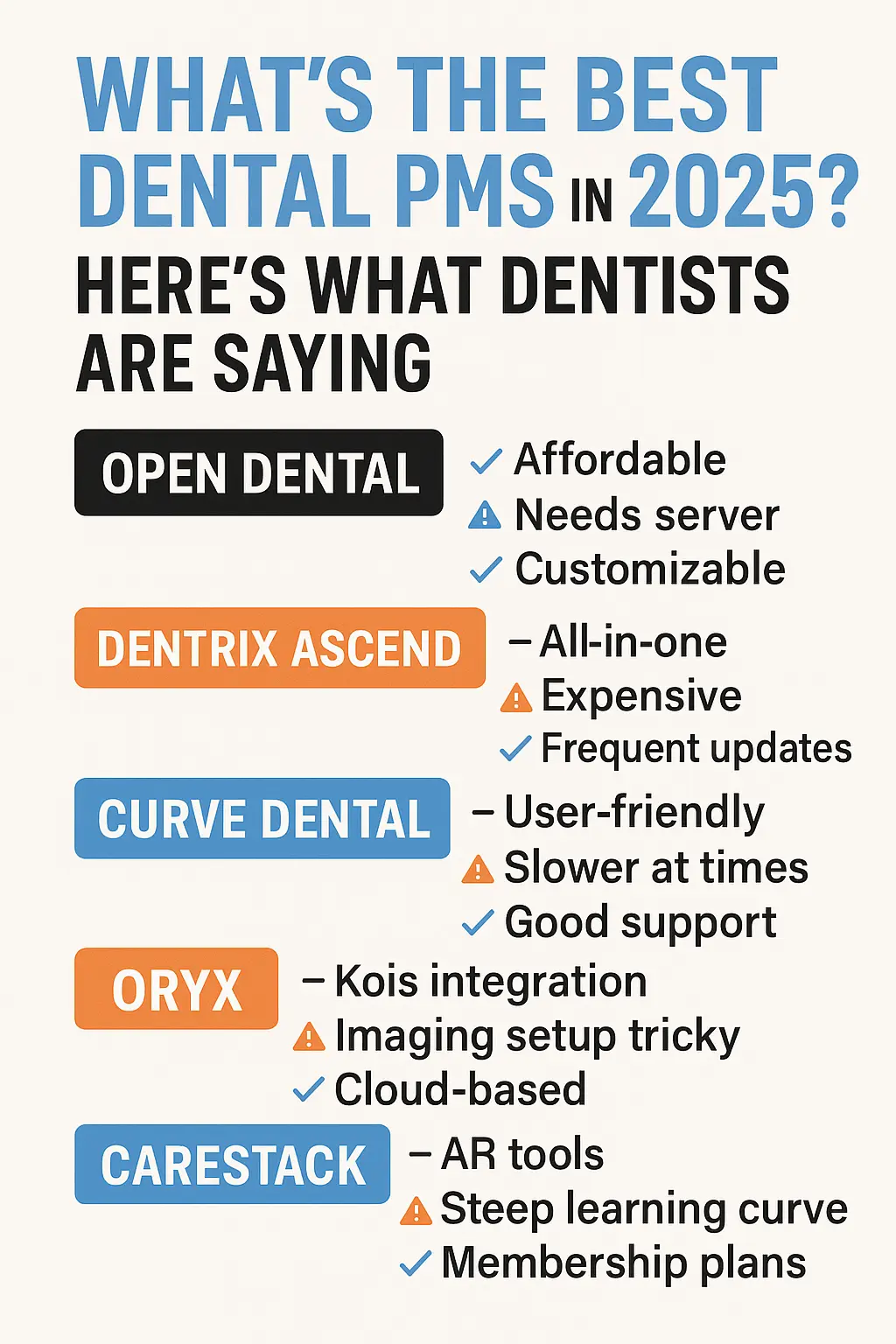
Top 5 Dental PMS Solutions: In-Depth Comparison
1. Dentrix (by Henry Schein One)
Market Position: The industry veteran with 35+ years and 35,000+ practices
Key Strengths:
- Most extensive third-party integration ecosystem (300+ partners)
- Robust reporting and analytics capabilities
- Strong insurance management features
- Excellent training resources and certification programs
Considerations:
- Higher upfront costs ($3,000-$8,000 initial investment)
- Steeper learning curve for new users
- Annual support contracts can be expensive ($2,000-$4,000/year)
- Interface feels dated compared to newer competitors
Best For: Established practices wanting proven reliability and extensive integrations
Pricing: Server-based: $3,000-$8,000 setup + annual support | Cloud (Dentrix Ascend): $500-$700/month
2. Open Dental
Market Position: The open-source champion with transparent pricing
Key Strengths:
- No vendor lock-in - you own your database
- Transparent, affordable pricing ($129-$430/month)
- Highly customizable with open architecture
- Active user community and forums
- Free trial with full features
Considerations:
- Less polished interface than commercial alternatives
- Requires more technical expertise for customization
- Fewer built-in marketing tools
- Cloud hosting requires third-party providers
Best For: Tech-savvy practices wanting control and affordable pricing
Pricing: $129-$430/month depending on support level + optional cloud hosting
3. Eaglesoft (by Patterson Dental)
Market Position: Clinical excellence with strong periodontal features
Key Strengths:
- Superior periodontal charting capabilities
- Excellent clinical note templates
- Strong integration with Patterson equipment
- Robust patient communication tools
Considerations:
- Limited cloud options
- Fewer third-party integrations than Dentrix
- Higher learning curve for administrative features
- Customer support can be inconsistent
Best For: Clinically-focused practices, especially those with strong perio programs
Pricing: $2,500-$6,000 setup + $1,500-$3,000/year support
4. Cloud 9 Software
Market Position: The cloud-native innovator
Key Strengths:
- True cloud architecture (not just hosted)
- Modern, intuitive interface
- Excellent mobile apps for iOS/Android
- Built-in patient engagement tools
- No servers, IT, or backups needed
Considerations:
- Requires reliable internet connection
- Limited customization compared to server-based options
- Newer player with smaller user base
- Some advanced features still in development
Best For: Modern practices prioritizing mobility and minimal IT
Pricing: $299-$499/month per provider, all-inclusive
5. Curve Dental (now Curve SuperHero)
Market Position: The all-in-one platform pioneer
Key Strengths:
- Integrated imaging included in base price
- Built-in patient engagement and reviews management
- Comprehensive analytics dashboard
- Two-way texting and email marketing included
- Excellent customer support with high satisfaction scores
Considerations:
- Higher monthly costs when fully featured
- Some users report occasional slowdowns
- Limited specialty-specific features
- Data migration can be complex
Best For: Practices wanting an all-inclusive solution without multiple vendors
Pricing: $375-$575/month per provider with most features included
Critical Features to Evaluate
Must-Have Features (Non-Negotiable)
- HIPAA Compliance: Encrypted data, audit trails, access controls
- Insurance Management: Eligibility verification, claim submission, ERA/EFT
- Clinical Charting: Odontogram, perio charting, treatment planning
- Scheduling: Operatory management, automated reminders, online booking
- Reporting: Production, collection, and patient analytics
- Imaging Integration: DICOM support, sensor compatibility
- Backup System: Automated, encrypted, and tested regularly
Nice-to-Have Features (Efficiency Boosters)
- Patient Portal: Online forms, treatment plans, payment options
- Mobile Apps: Access charts and schedule from anywhere
- Marketing Tools: Email campaigns, review management, referral tracking
- Inventory Management: Supply tracking and automated reordering
- Voice Integration: Voice-activated charting and commands
- AI Features: Predictive scheduling, no-show predictions, treatment acceptance optimization
Real Cost Breakdown: What to Actually Budget
Initial Costs
- Software License: $0-$8,000 (cloud vs. server)
- Data Migration: $500-$3,000
- Training: $1,000-$5,000
- Hardware Updates: $0-$10,000 (if needed)
- Implementation Support: $500-$2,000
Ongoing Costs
- Monthly Subscription: $129-$700/month (cloud)
- Annual Support: $1,500-$4,000 (server-based)
- Updates/Upgrades: $0-$1,000/year
- IT Support: $200-$500/month (server-based)
- Additional User Licenses: $30-$100/user/month
Red Flags to Avoid
- Hidden Fees: Ask for complete pricing including all modules
- Locked Contracts: Avoid multi-year commitments without escape clauses
- Poor Support: Check reviews specifically about customer service
- Limited Training: Ensure adequate training is included or available
- No Data Portability: Confirm you can export your data if needed
- Outdated Technology: Avoid systems not updated in the last year
Find Your Perfect PMS Match
Ready to cut through the noise and find your ideal Practice Management Software? Our interactive tool analyzes your specific practice needs and provides personalized recommendations from the solutions above.
Making Your Final Decision: The 10-Point Checklist
- Does it fit your practice size and specialty?
- Can your team learn it within 2-4 weeks?
- Does it integrate with your current tools?
- Is the total cost within 2-3% of collections?
- Are current users happy (check reviews)?
- Is the vendor financially stable?
- Can you get a free trial or demo?
- Does it solve your biggest pain points?
- Is support available when you need it?
- Can it grow with your practice?
The Integration Factor: Working with AI Receptionists
Modern PMS selection isn't just about internal efficiency—it's about how well your system integrates with cutting-edge tools like AI receptionists. When evaluating your options, consider:
- API Availability: Open APIs allow seamless integration with AI phone systems
- Real-time Scheduling: AI receptionists can book appointments directly
- Patient Data Sync: Automatic updates between systems reduce errors
- After-hours Coverage: 24/7 AI support captures leads when you're closed
Conclusion: Start with Why, Not What
Before comparing features and prices, clearly define why you're switching or selecting a PMS. Are you:
- Starting a new practice and need affordable, modern tools?
- Scaling to multiple locations and need cloud access?
- Frustrated with poor support from your current vendor?
- Looking to reduce IT costs and complexity?
- Wanting better patient engagement tools?
Your "why" will guide you to the right solution. Remember, the best PMS isn't the one with the most features—it's the one your team will actually use effectively every day.
Pro Tip: Whatever PMS you choose, pair it with an AI receptionist to maximize your investment. While your PMS handles the backend, AI ensures you never miss a patient call, booking more appointments and growing your practice 24/7.
Related Topics
Ready to Automate Your Practice?
Join modern dental practices using Operaitor to answer every call, book more appointments, and grow 24/7.
No credit card required for demo